

Overview
Frontier GPS provides greater visibility into where your monitoring equipment is physically located. By automatically reporting positioning information, Frontier helps you verify installations, identify location discrepancies, and keep your equipment records accurate.
Whether you're managing a handful of devices or hundreds of customer locations, GPS makes it easier to understand where your equipment is deployed without relying entirely on manual records.
How does Frontier GPS work?
When GPS is enabled, your Frontier device periodically checks its physical position and reports updated information to the Pulsa dashboard.
The frequency of these checks depends on the device's performance settings:

Performance mode > GPS position check
High Performance > Every 1 hour
Low Power > Every 12 hours
If a change in position is detected, the Frontier can report its updated coordinates during a successful upload.
Note: GPS requires the Frontier to be powered on and able to successfully communicate over its cellular connection.
Understanding Location vs. Position
Pulsa uses two types of location information:
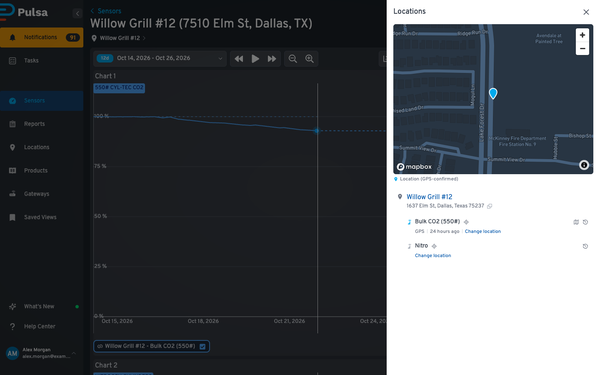
Location is the customer-defined address or site assigned to your sensor in the dashboard.
Position is the physical position reported by your Frontier device.
For example, a Frontier might be assigned to "Customer A – Main Facility" but report coordinates near "Customer B – Warehouse."
Pulsa can identify this discrepancy and suggest updating the assigned Location to reflect the device's reported Position.
What can you do with GPS?
- Review equipment movement: Access historical location and positioning information to understand where a device has previously reported from.
- Verify installations: Confirm that newly installed devices are reporting from their expected locations.
- Identify misplaced equipment: Find devices that may have been relocated or assigned to an incorrect site.
- Improve location records: Use reported positions to create new Locations or update existing ones.
Which devices support GPS?
GPS positioning is supported on all Frontier Link, Frontier Puck, and Frontier Digital models.
Devices must be running firmware version 5.5 or later.
Getting started
For newly registered Frontier devices, GPS can be enabled during the setup process.
Existing Frontier devices can also take advantage of GPS by enabling the feature through the dashboard.
If updating all or many Frontiers owned by your organization is desired, reach out to Pulsa Support for further assistance.